
OPC UA Client Plug-in
OPC UA Client for Industry 4.0: Connecting Data, Integrating Systems
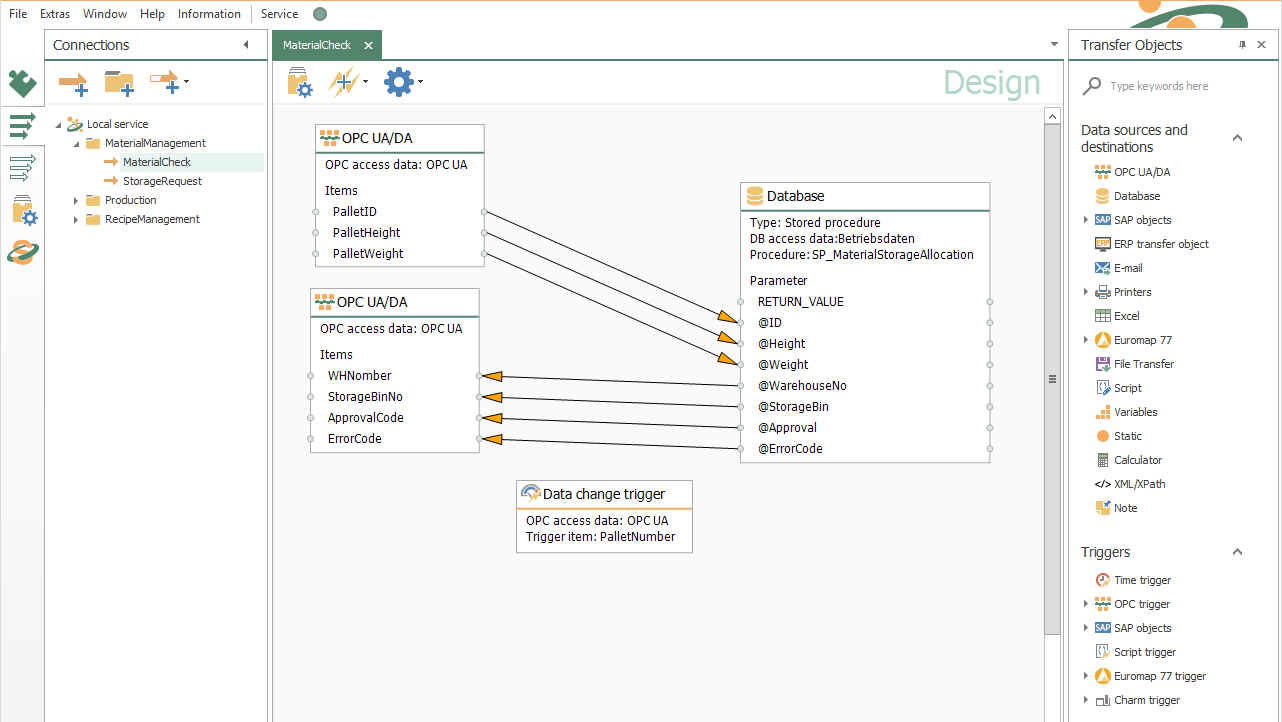
The OPC Router is an OPC UA/DA client. It reads and writes data from OPC servers and transfers it to a wide variety of systems (see screenshots). OPC UA is one of the key protocols for Industry 4.0 projects today. It allows thousands of devices to be addressed using a unified standard.
OPC servers are provided either by the device manufacturer itself or by third-party vendors. Modern devices such as the WAGO PFC-200 or Siemens S7-1500 can function directly as servers using OPC UA, without requiring a Windows platform.
Our tutorial stream under “OPC Router as an UA/DA Client and OPC UA Server” offers a detailed introduction.

These and other customers rely on the OPC Router






That’s how easy it is.
OPC UA connection via drag & drop
The connection of your systems via OPC UA is quite easy and intuitive with OPC Router using drag & drop. In the screenshot we show you an example of a connection of the OPC Router as an OPC UA Client. The OPC UA/DA client functionality loads items from an OPC Server. These are transferred to an SQL Server (via Microsoft SQL Plug-in). The return values are then written back to the OPC Server and transferred to the controller.
Connect OPC UA servers securely and reliably
Achieving more with coupled systems:
With the OPC UA Client plug-in, the OPC Router connects machines, controllers, and other automation components to an OPC UA server. Client-server communication enables standardized, vendor-independent access to process data. The OPC Router can read data from the OPC UA server, process it, and write it back to the server or to the connected PLC.
The connection is established by linking to the OPC UA server via its server address or the appropriate OPC UA endpoint. Configuration is done graphically in the OPC Router. This allows OPC UA data to be connected to databases, SAP systems, MQTT, REST interfaces, or cloud platforms without the need for extensive programming.
OPC UA has a comprehensive security concept. Depending on the requirements of the OPC UA server in use, security settings such as certificates, authentication, signing, and encryption can be taken into account during configuration. This allows OPC UA communication to be set up in line with the security requirements of the respective IT and OT infrastructure.
Bringing Industry 4.0 to life with OPC UA
- Achieving more with coupled systems:
OPC ensures that thousands of devices can be addressed via a similar standard. Alone, each device would be a black box on its own without a proprietary connection to the outside world. Via OPC data exchange the data of the devices are available for the OPC Router and thus for all systems connected to it. - Industry 4.0 with OPC UA:
The networking of production has always been the core task of OPC. This makes OPC and especially OPC UA one of the most important protocols for implementing Industry 4.0. OPC provides the OPC clients with the data from each device at the right time and format, integrating it into the Industry 4.0 infrastructure. The OPC Router distributes the data as a gateway to the correct receivers, making Industry 4.0 alive. - About the OPC Router:
With the OPC Router as a OPC UA Gateway, you can realize the data exchange of your systems graphically. The OPC Plug-in works as an OPC UA Client.
OPC UA Client Plug-in application examples


Read OPC UA data from the PLC and write it to a database
PLCs have the task of controlling complex machine sequences and processes in automation. However, it is becoming increasingly common for decisions based on data from other systems to be made as part of the process. For example, products are produced individually according to customer requirements. The customer-specific parameters are stored in databases. The PLC can trigger a transfer of these special production parameters via the coupling with the OPC Router. The OPC Router reads the corresponding selection criteria from the PLC via OPC UA (e.g. order number), loads the data from the database and writes them via OPC UA to the PLC. The standard “OPC” allows the OPC Router to do this with any controller type and other OPC compatible devices.

Connect OPC data sources in local networks via edge computing
Industry 4.0 depends on networking. At the field level, the OPC protocol has long established itself as the leading protocol for data exchange. More devices can provide their data directly via OPC UA. In addition, OPC servers with many driver implementations, e.g. Kepware OPC Server with over 150 drivers, ensure that the majority of automation devices can be accessed via OPC UA. The OPC Router with its OPC UA client Plug-in can be used as an edge computing unit in which it connects the available OPC data sources in the local network, preprocesses and buffers data (via SQL database). The buffered data can be secured, for example, with the store & forward function. The OPC Router then transfers the data to higher-level systems (e.g. SAP) or via MQTT to the cloud. This is, of course, bidirectional, so that data from the cloud can also be sent to the devices and controllers via this way.
Receive confirmations and error messages from the shopfloor via OPC UA
The OPC Message Trigger object of the OPC Router reduces the probability of failure and can prevent production stops. When communicating with a machine the OPC Router returns an acknowledgement of receipt to the machine by means of the trigger object. When a pallet is completed, the OPC Router receives a message about this. With a so-called handshake the OPC Router confirms the completion and the PLC can automatically continue with its next job. If an error occurs during processing by the OPC Router, it sends an error message back to the PLC. This can, for example, trigger a deliberate production stop before damage to the product or machine occurs.
Video tutorial: Easy transfer of OPC Data into CSV Format
This video tutorial shows how easy it is to read process values out of an OPC UA server and save them into a CSV file. The process values are read on data change and create a new record set into an existing csv file (or creates a new one, if one already exists). Just connect OPC UA data points, CSV document and create corresponding CSV file simply via drag & drop.
Connecting Systems with the OPC Router OPC UA Client Plug-in
Transfer-Objects
The transfer object of the OPC UA Client Plug-in allows access to the data points of the OPC Server.
Read and write OPC UA data
The transfer objects of the OPC UA Client plug-in provide access to the data points of an OPC UA server. The OPC Router can read process values from the server, process them within a graphically configured connection, and write data back to the OPC UA server or to the connected controller.
The selected OPC UA data points are available within the transfer objects as sources or targets. They can be connected via drag & drop to fields from other systems, such as an SQL database, an SAP system, a REST interface, an MQTT broker, or a cloud platform.
In addition to the current value, the OPC UA server provides further information about the data point. This includes the data type, the associated timestamp, and the quality of the value. This allows the OPC Router to determine whether a value is valid and whether a connection to the connected device exists.
Data Points
The OPC standard defines the structure and organization of data points. Each data point has a unique name. As an OPC client, the OPC server provides the current value, the associated time and the quality of the value (device connected, no connection, etc.).
The desired data points are selected via browsing. These are available in the transfer object of the graphical configuration and can be connected to other fields during the transfer
Trigger
The OPC UA Client Plug-in includes several triggers.
DataChange Trigger
The DataChange Trigger is configured for an OPC data point and triggers the transfer when the data point changes.
Limit Trigger
The limit value Trigger monitors a data point for compliance with limits. It can be checked for exceeding or falling short. A hysteresis can also be set.
Bit trigger
Handshakes are often implemented for data transfers. The bit trigger is the simplest variant here. The OPC Router checks whether a bit requests a transfer. Once transferred, the bit is optionally reset or another bit is set as response. The success of the transfer can be transferred to another data point.
Message Trigger
The message trigger is the further development of the bit trigger in the form of telegram data exchange. Here not a bit is checked, but a counter is checked for a value change. In response, the number that triggered the transfer is written back after the transfer.
The reliability and traceability of this exchange is significantly higher.
Browsing
The OPC UA Client Plug-in can browse the data points of the OPC Server.
Easily find data points in the OPC UA address space
Using integrated browsing, the OPC UA Client plug-in reads out the structure of the connected OPC UA server. The hierarchically structured OPC UA address space, with its data points and nodes, is displayed in the OPC Router as a clearly organized data point tree.
This makes it possible to search even large data sets and select the required process values in a targeted way. The data points can then be transferred directly into the graphical configuration and connected to the fields of other transfer objects.
Each selected data point is identified by its unique path within the information model. In addition, the OPC Router adopts the available type information of the data point. This makes the information needed for further processing and transmission of OPC UA data readily available.
Haven’t found the right information yet?
Here you will find more information on our software as well as an overview of all available OPC Router Plug-ins. We also provide a free demo with which you can test a fully functional version of OPC Router.