
5.7Release News · OPC Router
OPC Router 5.7 – The Logic Update
What used to cost you scripts, detours across several Flows or outside help now takes minutes to configure: conditions, reusable functions and error handling are ordinary building blocks in the Flow – and the reworked variables provide the memory to go with them.
For you that mainly means less engineering effort. Fewer building blocks for the same result, changes in one place only, and errors that handle themselves instead of triggering a phone call. See how in the webinar recording.
More logic directly in the Flow
Four building blocks that save engineering time
If-then without a script – configured in minutes
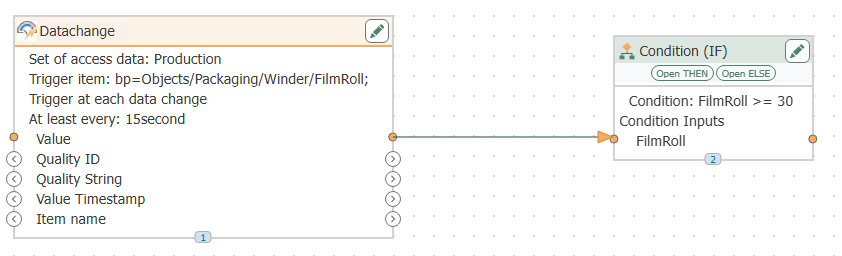
Almost every project eventually needs a decision: this value one way, that one another. Until now that meant detours across several Flows, or a script nobody wanted to touch later on. With the new Condition (IF) TO you drag the branch into the Flow as a building block and configure it instead of programming it.
Typical case in a project: if a temperature exceeds the limit, a message should go to the MES; everything below it only goes into the database. That used to be two Flows and a script, today it is one building block with two branches – and the status view later shows you which branch ran.
What you gain
- Finished faster: one building block replaces the rebuild across several Flows.
- No scripting know-how needed: the decision is configured, not programmed.
- Still understandable in three years: the logic is visible in the Flow, not hidden in a script.
Build once, use across the whole project
Copy-and-paste is the most expensive part of many projects – not when you create it, but with every later change. With the new Function (FX) you define a sequence a single time and call it anywhere, with fixed inputs and outputs like any other transfer object.
Typical case in a project: 30 machines, the same data preparation. If the specification changes, you maintain one function instead of 30 Flows – changed once, it applies at every call site.
What you gain
- Maintenance in one place: one change instead of dozens of follow-ups – that saves time on every rollout.
- Fewer sources of error: what is not copied cannot be forgotten in a copy.
- Maintainable for years: recurring logic sits centrally, not scattered across individual Flows.
Catch faults instead of letting the Flow break off
The ERP responds with an error, a load peak slows the target system down – cases like these are part of operation. With the new Try/Catch TO you decide in advance what happens then: the actual sequence sits in the try Subflow, your reaction in the catch Subflow. It knows the error message and where things went wrong.
Typical case in a project: the order record does not make it into the ERP. Instead of an aborted Flow, the OPC Router tries again via retry and only then notifies the shift supervisor by e-mail – with the specific error message in the text.
What you gain
- Fewer outages: a single error no longer stops the entire route.
- Less troubleshooting: the message tells you immediately what failed and where.
- Calmer operation: the automatic retry absorbs temporary faults without anyone stepping in.
The memory that holds your Flow logic together
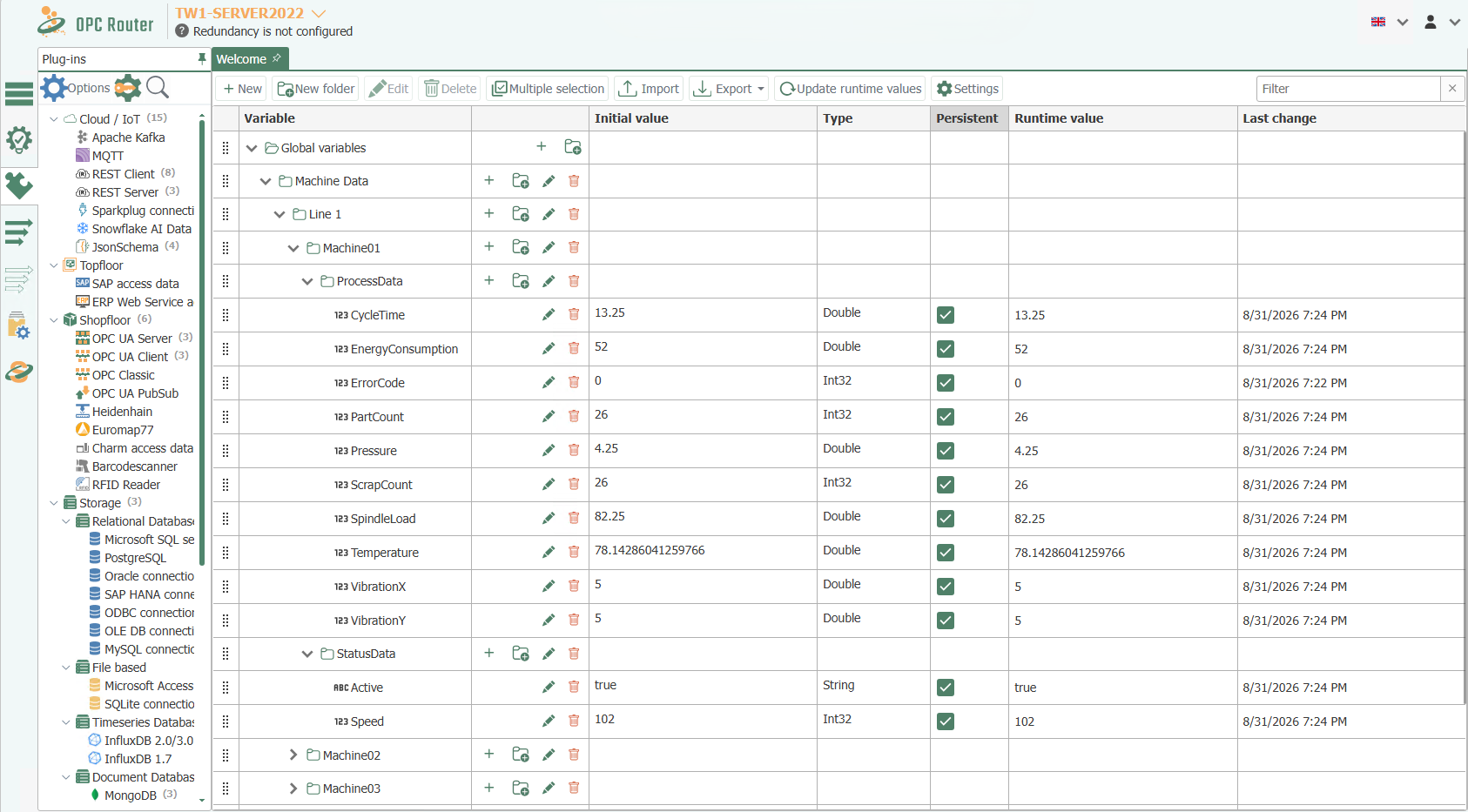
Logic needs a place where values remain beyond the single run. The variables have been completely reworked for that: they now sit in a folder hierarchy like in a file explorer – even with a thousand variables you find the right one in seconds. Credentials are stored as a secret string, meaning encrypted in storage and only shown masked in the interface.
What is also new is that variables calculate key figures themselves: you enable minimum, maximum and average as an option on the variable, and the OPC Router does the rest in the background. All you write in is the measured value.
And when the variable name only comes into being at runtime, from a machine ID for example, you address it directly with dynamic reading and writing – without building a separate branch for every machine.
Typical case in a project: 15-minute key figure
A machine’s consumption value goes into a variable once per second, with aggregation enabled on that variable. A time trigger writes the key figure into the database every 15 minutes – instead of 900 individual values per quarter hour, one clean value arrives in the target system. That used to require helper variables for sum and count plus a second Flow that calculates and resets. Today it is an option on the variable.
What you gain
- Find your way faster: folders and a tree view instead of one endless list.
- Key figures without a calculation Flow: minimum, maximum and average are formed in the variable, and only the finished key figure goes to the target system.
- Credentials kept safe: the secret string is stored encrypted and shows the value only masked.
Security without maintenance effort
One maintenance task less in everyday operationCertificates that keep themselves up to date
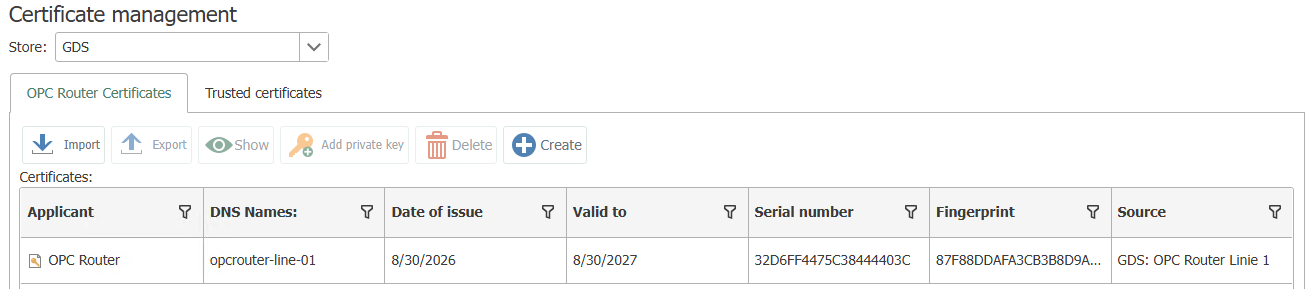
Certificates are the ID cards of secure OPC UA connections – and so far a manual job on every installation. If one expires unnoticed, in the worst case communication with the machine comes to a halt. From version 5.7 the OPC Router fetches its certificates automatically from your company’s central certificate server, the OPC UA GDS, and renews them in good time on its own.
Typical case in a project: 40 installations across several plants. Setup takes a few minutes per router, after which IT is in charge: if they revoke a certificate centrally, that applies in the OPC Router immediately. If the GDS is temporarily unreachable, operation continues unchanged.
What you gain
- One maintenance task less: no certificate is maintained by hand individually any more.
- No outages from expired certificates: renewal happens in good time and without intervention.
- Compliance-ready: IT keeps central control over all certificates.
More news in release 5.7
Change Gate TO
The Change Gate runs a Subflow only when a monitored value has genuinely changed in a relevant way. Database, MQTT, REST or file storage then receive only what is new – which noticeably reduces load and cost on the target side.
Database Log Table transfer object
New logging routes start without preparation: the OPC Router checks the table structure itself, and you define how deviations are handled. For MSSQL, MySQL, PostgreSQL and other relational plug-ins.
Enabling and disabling plug-in instances
Plug-ins that are not in use can be switched off, or switched off automatically by the OPC Router. Fewer unnecessary connections to your systems, more clarity in the project.
New names and technical basis
Connections are now called Flows, arrows are called Item Links. Technically, 5.7 is built on .NET 10, and automatic logouts after inactivity have been added.
In summary: the same result in less time
Version 5.7 moves logic to where you already work: into the Flow. Condition (IF), Function (FX), Try/Catch and the new variables replace scripts and detours with building blocks that you configure. That shortens engineering, turns changes into a matter of minutes and keeps projects understandable years later.
On top of that, certificate management via OPC UA GDS takes one of the most tedious maintenance tasks out of everyday operation entirely, and the Change Gate relieves your target systems. In short: less effort in engineering, fewer disruptions in operation.